
-Eswatini Communications Commission
As Eswatini commemorates National Cybersecurity Awareness Month under the theme ‘Tivikele, Stay Safe Online,’ we are reminded that protecting our digital world goes beyond installing antivirus software or setting strong passwords.
When we think of cyberattacks, we often picture complex coding, hacking into firewalls or exploiting technical glitches. However, cybercriminals have discovered a far easier way into secure systems: Manipulating people.
This tactic is known as social engineering, the art of psychological manipulation used to trick individuals into handing over confidential information, money or access to secure networks. Instead of hacking the machine, criminals hack the human.
How Social Engineering Works in Everyday Life
Social engineers exploit basic human emotions: Trust, fear, curiosity, urgency and the desire to help. Here are everyday scenarios many emaSwati encounter:
1. Phishing via SMS or Email (The ‘urgent bank notice’)
The scenario: You receive an SMS claiming your bank account or Mobile Money wallet has been suspended due to incomplete registration.
The message instructs you to click a link urgently or dial a number to ‘verify’ your details.
The trap: Panicked by the thought of losing access to your funds, you click the link, which leads to a fake webpage designed to steal your login credentials or PIN.
Key lesson & tip: Real financial institutions will never ask for sensitive credentials via SMS links. Pause and verify: Open your official banking or Mobile Money app directly or call the official customer care number, never use the contact details provided in the suspicious message.
2. Impersonation & pretexting (The service support)
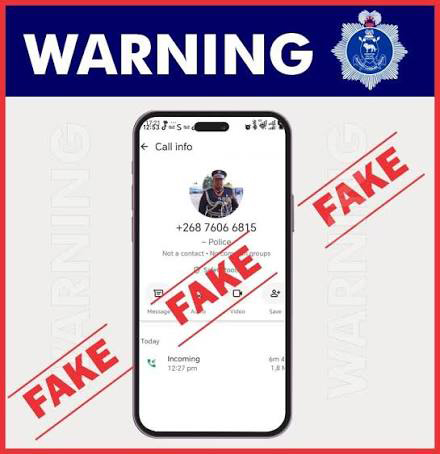
The Scenario: You receive a call from someone claiming to represent a local mobile network provider and to be assisting the police with an investigation into phone numbers linked to ‘facata’ scams. The caller instructs you to enter a code on your phone, claiming that it will clear your number from the investigation.
The trap: The caller sounds professional and authoritative, creating pressure to comply. By entering the code, you may be unknowingly sending money to the perpetrator.
Key lesson & tip: Mobile network providers and the police will not ask you to dial or enter a code to clear yourself from an investigation. Verify the caller: End the call, then contact your mobile network provider directly using a verified telephone number or official email address before taking any action.
3. Baiting & social media scams (The ‘too-good-to-be-true offer’)
The scenario: You see a Facebook or WhatsApp post promising guaranteed returns on a small investment, free airtime vouchers or a luxury giveaway if you fill out a short survey with your personal details.
The trap: The promise of quick gain prompts you to share your full name, phone number and national ID – data that scammers gather to impersonate you or compromise your accounts.
Key lesson & tip: If an offer seems too good to be true, it almost certainly is. Protect your personal data: Refrain from filling out random online forms and never trade personal identifiers for promised freebies or quick investment returns.
4. WhatsApp account hijacking (the ‘accidental SMS code’)
The scenario: You get a WhatsApp message from a friend or relative saying: “Hey! I accidentally sent a 6-digit verification code to your phone number by mistake. Could you please forward it back to me?” Shortly after, an SMS containing a verification code arrives on your phone.
The Trap: Because the message comes from a familiar contact (whose account has likely already been hacked), you forward the code. The attacker immediately uses that code to log into your WhatsApp account on another device, locking you out and messaging your contacts for money.
Key Lesson & Tip: A registration or verification code sent to your phone is for your eyes only. Never forward verification codes, passcodes or One-Time PINs (OTPs) to anyone, even family or friends. Enable Two-Step Verification in your WhatsApp settings (Settings > Account > Two-Step Verification) to add an extra layer of protection with a personal PIN.
The Devastating Impact of Social Engineering
The fallout from a successful social engineering attack can be severe for both individuals and organisations:
Financial loss: Direct theft of personal savings, Mobile Money funds or corporate bank accounts.
Identity theft: Stolen personal details can be used to open fraudulent accounts, take out loans or execute crimes under your name.
Corporate breaches & ransomware: A single employee clicking a malicious link can compromise an entire corporate infrastructure, resulting in operational downtime, loss of sensitive data, regulatory penalties and reputational damage.
Emotional Distress: Victims often suffer anxiety, stress and embarrassment after falling prey to manipulation.
How to Protect Yourself: Practical Cyber Hygiene Tips
Under the banner of Tivikele, staying safe online requires building daily habits that shield you and your organization from deception.
Protecting yourself at work
Verify Before You Trust: Always double-check requests for sensitive data, wire transfers or system access through a secondary, verified communication channel (e.g., calling the sender directly using an official directory number).
Never share your passwords: Legitimate IT staff will never ask for your password, PIN, or multi-factor authentication (MFA) codes.
Lock your workstation: Always lock your computer (Windows key + L or Cmd + Ctrl + Q) when leaving your desk, even for a brief moment.
Report suspicious activities: If you receive an unusual email or phone call, report it immediately to your internal IT/Cybersecurity team or focal point.
Protecting Yourself
in Daily Life
Pause before clicking: Never click on links in unsolicited SMS messages or emails. Go directly to official websites or apps instead.
Beware of artificial urgency: Scammers rely on creating panic (‘Your account will be closed in 1 hour!’). Whenever you feel rushed, pause and think critically.
Secure your mobile money & mobile banking: Never reveal your PIN to anyone—not even someone claiming to be a customer support representative.
Practice good social media privacy: Avoid oversharing personal details (e.g., date of birth, location or work badge photos) on public social media profiles that scammers can use to build trust.
Take Action This Cybersecurity Awareness Month
Security is a shared responsibility. You can equip yourself and your family with essential digital skills today:
Enrol in free cybersecurity courses: https://tinyurl.com/FreeCybersecurityCourses26
Download the Official Campaign Toolkit: https://tinyurl.com/CyberToolkit26
Tivikele — Do your part to secure our digital world!